



AI-Ready Software Architecture: How to Build Applications That Can Scale With AI in 2026
Artificial intelligence is changing how businesses develop products, serve customers, and manage everyday operations. From intelligent recommendations to automated business workflows, AI is becoming an important part of modern software applications.
However, adding an AI model to an existing application does not automatically make that application scalable, reliable, or ready for production. Businesses also need the right architecture, data infrastructure, security controls, and monitoring systems to support AI as their requirements grow.
What Is AI-Ready Software Architecture?
AI-ready software architecture is an approach to designing applications so they can integrate artificial intelligence without compromising performance, security, maintainability, or the existing business logic.
Instead of treating AI as an isolated feature, development teams design the application to support AI services, data pipelines, external APIs, automated workflows, and future model improvements.
For example, a customer support platform might initially use AI to suggest responses to support agents. As the business grows, the same platform may need document search, ticket classification, customer sentiment analysis, and automated ticket routing. A flexible architecture makes these capabilities easier to introduce without rebuilding the entire application.
The goal is not to make every part of an application dependent on AI. It is to create a stable software foundation where AI can be added, improved, or replaced as business needs evolve.
Why Traditional Software Architecture Needs to Evolve
Traditional software systems generally rely on predictable business rules, database queries, and defined application workflows. AI introduces additional considerations because model outputs can vary, external AI services can experience delays, and usage costs may change with demand.
Several challenges become more important when AI enters the system:
- Variable response times: AI requests may take longer than conventional database queries or API operations.
- Uncertain outputs: AI-generated responses require appropriate validation and, in some cases, human review.
- Data dependencies: AI features depend on relevant, accurate, and appropriately protected business information.
- Changing costs: Model usage, data processing, and infrastructure can increase as adoption grows.
- New security risks: Applications must protect sensitive information and prevent unauthorized actions through AI integrations.
These challenges do not mean that AI applications must be complicated. They mean architecture decisions should account for AI behavior from the beginning rather than addressing every issue after deployment.
1. Design Modular Applications With Clear Responsibilities
One of the most useful architectural decisions is separating business logic from AI-specific functionality.
When AI calls are mixed directly into controllers, database operations, and core business rules, even a small change can affect several parts of the application. This makes testing, debugging, and replacing AI providers more difficult.
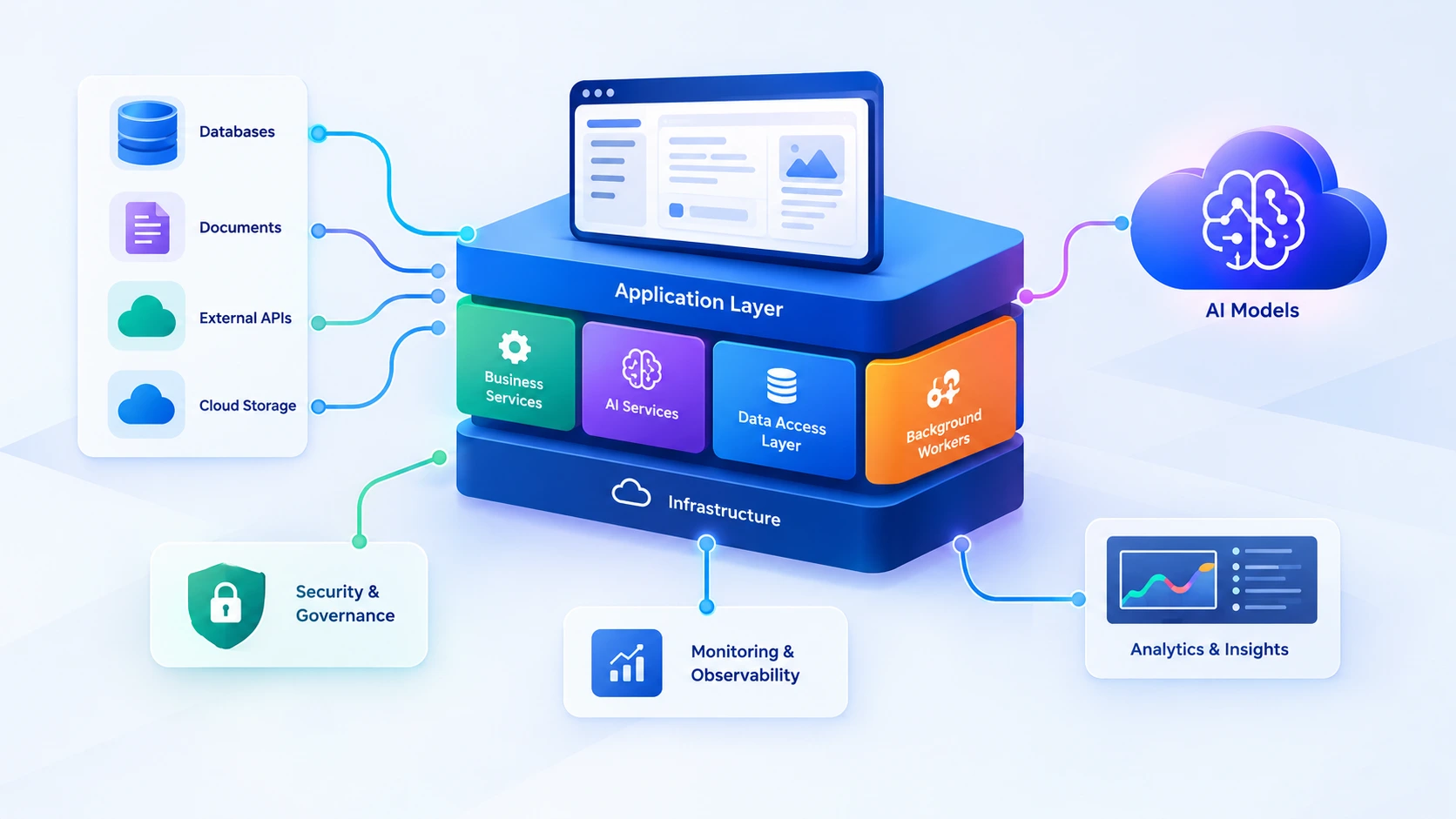
A modular architecture separates responsibilities into components such as:
- Frontend interfaces and user interactions.
- Backend services responsible for business rules.
- AI services responsible for model requests and response handling.
- Data access layers for databases and document storage.
- Background workers for long-running or asynchronous operations.
- Monitoring and security components for operational oversight.
For example, an e-commerce platform can keep its pricing, inventory, and payment rules within conventional backend services while using AI for product discovery, recommendations, or customer support.
This separation allows development teams to improve AI capabilities without putting critical transaction logic at unnecessary risk.
2. Build a Reliable Data Foundation
AI features are only as useful as the information available to them. An application may use a powerful model, but inaccurate records, outdated documents, duplicated data, or poorly controlled access can undermine its results.
Businesses should establish a clear data strategy before expanding their AI capabilities. This includes identifying authoritative data sources, defining access permissions, maintaining data quality, and deciding how information will be updated.
For applications that answer questions using internal documents, retrieval-augmented generation (RAG) can connect a language model to relevant business information. The application retrieves suitable content and supplies it as context for generating a response.
A well-designed RAG implementation should also consider document permissions, source freshness, retrieval quality, and whether the response accurately reflects the retrieved information.
Businesses should avoid giving AI unrestricted access to their entire database. Access should be limited to the information required for each task, with authorization enforced by trusted application services.
3. Treat AI as a Service, Not a Single API Call
Connecting an application to an AI provider is often straightforward. Operating that integration reliably over time requires more planning.
A dedicated AI service layer can manage model selection, prompts, request validation, timeouts, retries, response formatting, and provider-specific integrations. It also creates a central place to apply usage limits and monitor AI-related failures.
A reliable implementation should consider:
- Timeouts and retries: Prevent requests from waiting indefinitely and retry only when appropriate.
- Fallback behavior: Provide a useful alternative when an AI provider is unavailable.
- Input and output validation: Check that requests and responses meet the application's requirements.
- Provider flexibility: Reduce unnecessary dependency on provider-specific features where practical.
- Usage controls: Apply quotas, rate limits, and spending thresholds.
Not every project needs a complex AI abstraction layer. The design should match the number of integrations, expected traffic, reliability requirements, and likelihood of future changes.
4. Choose the Right Architecture for Your Growth Stage
Businesses often assume that supporting future growth requires microservices from day one. In practice, the right architecture depends on the product's complexity, team size, deployment needs, and operational capabilities.
Start With a Modular Monolith
For many startups and early-stage products, a modular monolith is a sensible starting point. The application runs as a unified system but maintains clear boundaries between business domains and services. This reduces deployment and infrastructure overhead while keeping the codebase organized.
Introduce Background Processing
Tasks such as document processing, bulk content generation, report creation, and large-scale data analysis may not need to finish during a user's request. Background queues and workers can process these tasks separately and notify users when results are ready.
Adopt Microservices When There Is a Clear Need
As a product expands, selected components may benefit from independent deployment and scaling. AI processing, search, notifications, or document ingestion could become separate services when workload patterns or team ownership justify that separation.
The objective is to scale the parts of the application that need it, not to introduce distributed-system complexity without a measurable benefit.
5. Make Security and Governance Part of the Design
AI integrations can introduce risks that conventional application security controls do not fully address. A system may accidentally expose private information, follow malicious instructions embedded in retrieved content, or allow an AI workflow to perform an action beyond its intended permissions.
Security should therefore be included in the initial architecture rather than added as a final deployment step.
- Enforce authentication and authorization on the server.
- Protect API keys and credentials using secure secret management.
- Limit the data sent to external AI providers.
- Apply role-based permissions to tools and business operations.
- Validate AI-generated parameters before executing sensitive actions.
- Keep audit records for important operations.
- Require human approval for high-impact or irreversible actions.
For instance, an AI assistant may prepare a refund recommendation, but the actual refund should still pass through the application's authorization, transaction, and approval rules.
AI should help the application make better use of information without bypassing the controls that protect customers and the business.
6. Test AI Features Beyond Traditional Functional Testing
Conventional software testing checks whether an application behaves as expected for defined inputs. AI systems require these tests plus additional evaluation because different inputs, model versions, or retrieved documents may produce different outputs.
A practical AI testing strategy should include:
- Unit tests: Verify application rules, validation, permissions, and error handling.
- Integration tests: Check communication with AI providers, databases, and external services.
- Evaluation datasets: Test representative prompts against expected quality criteria.
- Security tests: Check unauthorized access, prompt-injection scenarios, and sensitive-data exposure.
- Regression tests: Compare behavior after changing prompts, retrieval logic, or model versions.
- Human review: Evaluate outputs where accuracy, compliance, or customer impact requires expert judgment.
Teams should define measurable quality criteria for each AI feature. Depending on the use case, these may include factual accuracy, retrieval relevance, response latency, task completion, and the rate of successful human approvals.
7. Monitor Performance, Reliability, and Cost
An AI feature that performs well during development may behave differently when real customers begin using it. Production monitoring helps teams understand whether the feature remains useful, reliable, and affordable.
In addition to conventional application metrics, teams should track AI-specific signals such as:
- Model request volume and response latency.
- Error rates, timeouts, and provider availability.
- Token consumption and estimated cost per task.
- Retrieval quality and response evaluation results.
- Fallback frequency and human escalation rates.
- Business outcomes, such as reduced handling time or improved task completion.
Logging also requires care. Prompts and responses may contain personal or confidential information, so organizations should define retention policies, restrict access, and redact sensitive data where appropriate.
Monitoring these signals helps engineering teams identify expensive workflows, investigate failures, and improve the application using real operational evidence.
8. Use AI to Solve Measurable Business Problems
AI adoption is most effective when it begins with a clearly defined business problem instead of a technology trend.
Before implementing an AI capability, businesses should understand the current process, identify its limitations, and decide what improvement would justify the investment.
Consider these examples:
- Customer support: Reduce the time agents spend searching documentation and preparing responses.
- Healthcare administration: Help authorized staff organize information and prepare administrative summaries while maintaining privacy and professional oversight.
- Logistics: Extract information from shipping documents and flag records that need manual verification.
- SaaS products: Enable users to search business data or generate structured reports using natural language.
- Internal operations: Automate repetitive information-processing tasks with appropriate approval controls.
Each use case should have a baseline and measurable success criteria. These might include time saved per task, processing accuracy, cost per completed workflow, or a reduction in manual errors.
Starting with a focused use case makes it easier to validate value before expanding AI across additional parts of the business.
A Practical Roadmap for Building AI-Ready Software
Organizations do not need to redesign every application at once. A phased approach allows teams to improve the architecture while managing cost, delivery risk, and operational complexity.
- Assess the existing application. Review its architecture, data sources, integration points, security controls, and current operational limitations.
- Select a focused AI use case. Choose a problem with a clear business owner, suitable data, and measurable outcomes.
- Build a controlled proof of concept. Validate feasibility, response quality, integration requirements, and expected operating costs.
- Prepare the production architecture. Add appropriate access controls, validation, monitoring, error handling, and testing.
- Release to a limited group. Observe actual usage, gather feedback, and identify unexpected behavior before expanding access.
- Measure and improve. Compare results against the original business objectives and refine the system using evidence.
This approach helps organizations avoid investing heavily in infrastructure before they understand the practical value and requirements of their AI solution.
Conclusion
Building AI-ready software is about more than choosing a model or connecting an API. It requires an application architecture that supports reliable integrations, well-managed data, appropriate security, meaningful testing, and ongoing operational monitoring.
Businesses that establish these foundations can introduce new AI capabilities without making every future change more difficult or expensive. They can also evaluate new models and technologies as they become available, while preserving the stability of their core software systems.
The most effective strategy is to start with a real business problem, build on a maintainable software foundation, and expand only when results justify the next step.
Build Your Next Software Solution With Expoders
Planning a new SaaS product, modernizing an existing application, or integrating AI into your business software? The right technical foundation can make it easier to deliver new features, manage operational risks, and support future growth.
Explore Expoders to learn more about our software development services and how custom technology solutions can support your business goals.