



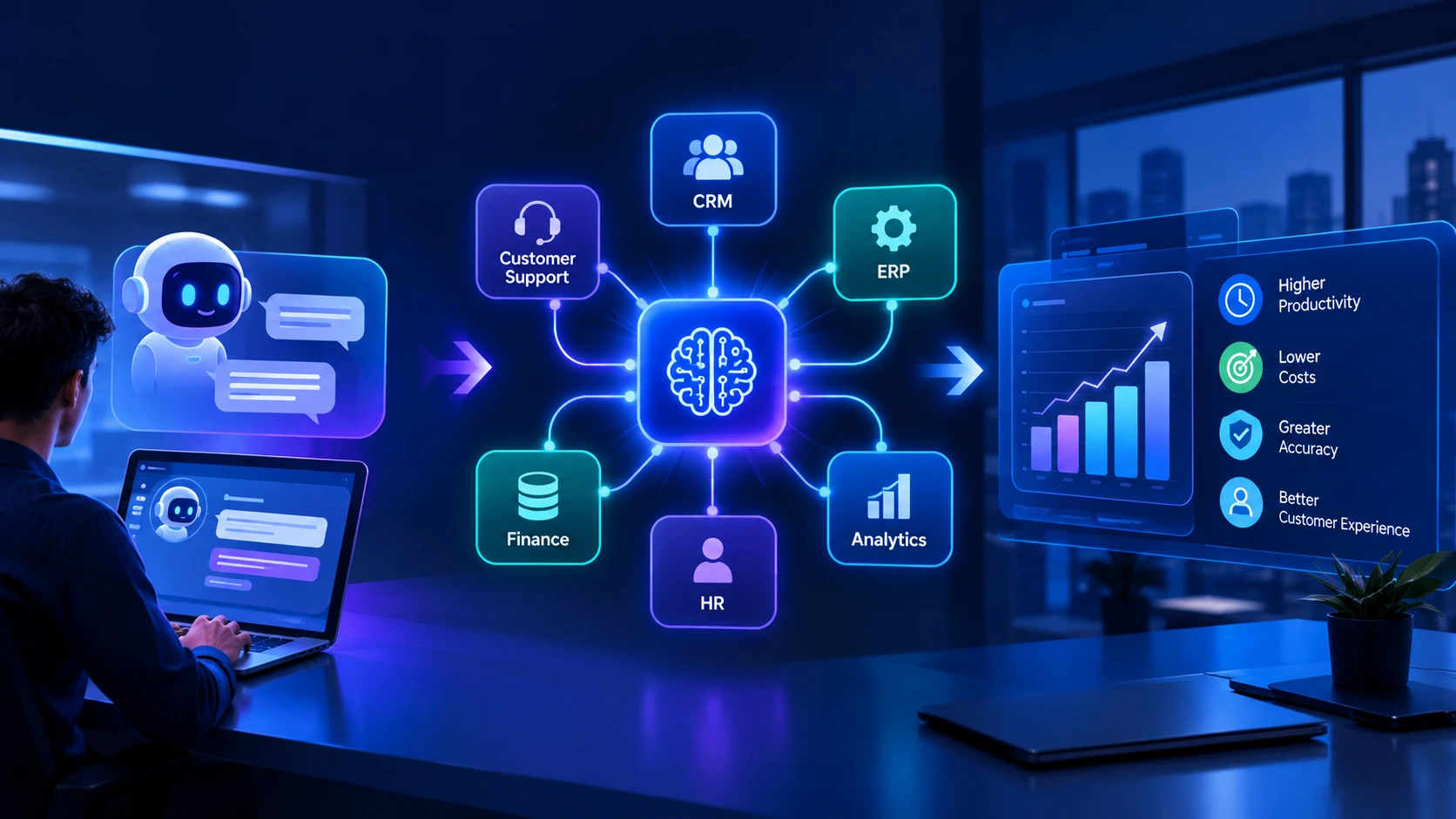
From AI Copilots to AI Workflows: How Businesses Can Turn AI Into Measurable Results in 2026
Artificial intelligence has moved beyond experimentation. Businesses are now exploring how to integrate AI into everyday operations, connect existing software systems, and automate tasks that previously required hours of manual work. However, adopting AI tools alone does not guarantee better business outcomes.
The real opportunity lies in moving from AI copilots that assist individual employees to intelligent workflows that help complete business processes from beginning to end, with appropriate controls and human oversight.
Introduction: The Next Stage of Business AI
Over the past few years, organizations have adopted AI-powered chatbots, writing assistants, coding tools, and data analysis applications. These tools can help employees work faster, generate ideas, and retrieve information. Yet many companies still struggle to translate these individual productivity gains into measurable improvements across their operations.
Consider a company that receives hundreds of customer support requests every day. An AI assistant might summarize each request or suggest a response. An AI-enabled workflow can go further by classifying the request, retrieving relevant customer information, checking applicable policies, preparing a response, updating the support system, and escalating complex cases to a human employee.
This distinction is important. Instead of using AI as another disconnected tool, businesses can integrate intelligence directly into the systems and processes that run their operations.
In 2026, organizations should focus not simply on how much AI they deploy, but on which business problems it solves, how reliably it operates, and whether its results justify the investment.
1. Why AI Copilots Are Only the Beginning
AI copilots are useful because they assist people without necessarily changing the underlying business process. Employees can ask questions, generate content, analyze documents, or receive recommendations while continuing to operate their existing applications.
However, this approach can leave important gaps. Employees may still need to copy information between systems, verify results, update records manually, and coordinate the next step themselves.
When these activities happen across multiple departments, the productivity benefits of individual AI tools can become difficult to measure.
The limitations of standalone AI tools
- Business information remains spread across disconnected systems.
- Employees must manually transfer data between applications.
- AI-generated answers may lack the context needed for reliable decisions.
- Teams have limited visibility into the complete workflow.
- Businesses may struggle to measure the time and money saved.
AI workflows address these challenges by connecting intelligence with business data, application logic, and clearly defined actions. Rather than replacing every existing tool, they make those tools work together more effectively.
2. What Is an AI Workflow?
An AI workflow is a business process that combines AI capabilities with software integrations, predefined rules, data sources, and automated actions. Depending on the task, the workflow may use a language model, an AI agent, traditional application logic, or a combination of these technologies.
A typical workflow may follow these steps:
- Receive: Collect a request, document, event, or data input.
- Understand: Use AI to classify information, extract details, or interpret intent.
- Retrieve: Access relevant information from authorized business systems.
- Decide: Apply business rules and determine the appropriate next step.
- Act: Update records, prepare responses, create tasks, or trigger other permitted actions.
- Verify: Check the result, record the activity, and request human approval when needed.
Not every workflow requires an autonomous AI agent. Many business processes are better served by a predictable automation pipeline with AI handling only the steps that require language understanding or interpretation.
The most effective architecture uses AI where it adds value and conventional software wherever deterministic behavior is preferable.
3. Five Business Areas Where AI Workflows Can Deliver Value
Customer support and service operations
AI workflows can categorize incoming requests, retrieve relevant account information, summarize previous conversations, suggest responses, and route cases to the appropriate team.
Routine requests may be handled automatically when the task is low-risk and the system has sufficient information. Complaints, sensitive account changes, and unusual situations can be escalated for human review.
Sales and customer relationship management
Sales teams often spend considerable time researching prospects, updating CRM records, preparing follow-ups, and maintaining pipeline information. AI workflows can help collect approved business data, summarize interactions, draft personalized messages, and create follow-up tasks.
Sales representatives remain responsible for relationship-building and important customer decisions, while repetitive administrative work can be reduced.
Finance and administrative operations
Finance teams process invoices, expense reports, purchase orders, receipts, and other documents that frequently contain unstructured information.
AI can extract relevant fields, compare records, flag discrepancies, and prepare transactions for review. Approval thresholds and authorization rules should remain enforced by the underlying application rather than relying solely on an AI-generated decision.
Human resources and recruitment
Recruitment workflows can assist with organizing applications, scheduling interviews, answering routine candidate questions, and preparing interview summaries.
Organizations should apply appropriate privacy safeguards and human oversight. AI should not make consequential employment decisions without a carefully evaluated, legally compliant process.
Internal knowledge and employee productivity
Employees frequently search across internal documentation, project management tools, support tickets, policies, and shared files to find the information they need.
A connected AI knowledge system can retrieve relevant information, provide answers with supporting sources, and help employees complete routine tasks. Access permissions must be respected so that users only receive information they are authorized to view.
4. Connecting AI With Existing Business Software
AI becomes more useful when it can securely interact with the systems where business information already lives. These systems may include customer relationship management platforms, enterprise resource planning software, accounting applications, help desks, internal databases, and document repositories.
Without reliable integrations, AI may provide recommendations without being able to complete the next step. Employees then become the bridge between disconnected tools, limiting the value of automation.
Building an integration layer
A practical AI architecture may include the following components:
- Application APIs: Connect AI workflows with existing software and business services.
- Data layer: Provide access to accurate, relevant, and permission-controlled information.
- Workflow engine: Coordinate tasks, retries, approvals, and process states.
- AI services: Handle classification, summarization, extraction, and reasoning where appropriate.
- Security controls: Enforce authentication, authorization, and restrictions on sensitive actions.
- Monitoring: Track errors, performance, usage, and business outcomes.
Technologies such as REST APIs, event-driven architecture, queues, and established integration standards can help connect these components. The right approach depends on the organization's existing systems, security requirements, and expected workload.
Businesses do not always need to replace their legacy software. In many cases, a carefully designed integration layer can extend existing investments while introducing new AI capabilities.
5. AI Agents Need Clear Boundaries and Human Oversight
AI agents can use tools, retrieve information, and perform sequences of tasks toward a defined goal. This makes them useful for certain workflows that involve multiple steps or changing inputs.
However, greater autonomy also introduces risks. An agent may misinterpret an instruction, use incomplete information, select an inappropriate tool, or produce an incorrect result.
For this reason, businesses should define exactly what each agent is allowed to access and do.
Practical safeguards for AI agents
- Give agents only the permissions required for their assigned tasks.
- Require human approval for payments, sensitive changes, and other high-impact actions.
- Validate AI outputs before passing them to critical systems.
- Maintain logs of tool calls, decisions, and important workflow events.
- Set limits on execution time, retries, and resource consumption.
- Test against unexpected inputs, malicious instructions, and failure scenarios.
- Provide a reliable fallback when AI services are unavailable or uncertain.
Human oversight does not mean that every automated step needs manual approval. It means designing appropriate checkpoints based on the potential impact of an error.
6. Measuring the Business Impact of AI Automation
AI adoption should be evaluated using business outcomes rather than the number of models, agents, or automation tools deployed. A technically impressive solution may still be a poor investment if it does not improve a meaningful business metric.
Before implementation, organizations should establish a baseline for the process they want to improve. They can then compare results after the workflow has been introduced.
Important metrics to track
- Processing time: How long does the task take before and after automation?
- Cost per task: What are the total operational and AI service costs for each completed task?
- Accuracy: How often are outputs correct and usable without substantial rework?
- Completion rate: How many tasks finish successfully without manual intervention?
- Exception rate: How often must a person investigate or correct a problem?
- Customer experience: Does the process improve response times, consistency, or satisfaction?
- Risk and compliance: Are errors, unauthorized actions, and policy violations properly controlled?
For example, a support team could measure average resolution time, customer satisfaction, and the percentage of cases requiring manual escalation. The team should compare these results with its original baseline and account for ongoing maintenance, integration, and AI usage costs.
The objective is not maximum automation. It is better business performance with acceptable cost, quality, and risk.
7. Common Mistakes Businesses Should Avoid
Organizations can encounter avoidable problems when they introduce AI without redesigning the underlying process.
Automating a poorly defined process
If a workflow has unclear ownership, inconsistent rules, or unreliable data, adding AI may simply make the existing problems happen faster. Document the process and establish clear responsibilities before automating it.
Giving AI too much autonomy too early
Start with limited permissions and well-defined tasks. Expand autonomy only after testing demonstrates that the workflow performs reliably under realistic conditions.
Ignoring integration and data quality
An AI system cannot consistently produce dependable results when it relies on outdated records, conflicting information, or incomplete context. Data quality and integration deserve the same attention as model selection.
Choosing technology before identifying the problem
Selecting an AI model or agent framework should follow a clear business requirement. The simplest reliable solution is often preferable to a complicated multi-agent system.
Failing to plan for production
A successful demonstration is not the same as a production-ready application. Real-world systems need monitoring, testing, access controls, incident handling, cost management, and ongoing maintenance.
8. A Practical Roadmap for Implementing AI Workflows
Businesses can adopt AI workflows incrementally instead of attempting to automate every department at once.
- Identify a high-value use case. Select a repetitive process with clear inputs, measurable outcomes, and a manageable level of risk.
- Map the existing process. Document the systems involved, decision points, exceptions, and tasks that require human judgment.
- Prepare the data and integrations. Confirm that required information is accurate, accessible, and protected by appropriate permissions.
- Build a focused pilot. Automate a limited workflow with defined boundaries, validation rules, and human approval where necessary.
- Test realistic scenarios. Evaluate normal cases, incomplete inputs, unexpected conditions, and potential security issues.
- Measure results. Compare performance with the original baseline and calculate the full cost of operating the solution.
- Improve and expand. Address weaknesses before extending the workflow to additional processes or departments.
This approach allows organizations to learn from a controlled implementation while limiting unnecessary complexity and financial risk.
9. The Future of AI-Enabled Business Operations
As AI capabilities continue to develop, business software is likely to become more context-aware and capable of coordinating complex tasks across applications. Employees may increasingly interact with systems through natural language while conventional software continues to enforce business rules, permissions, and reliable execution.
This does not mean that every organization needs fully autonomous agents or an entirely new technology platform. Different businesses will require different levels of automation depending on their size, industry, existing infrastructure, and risk tolerance.
The organizations best positioned to benefit will be those that combine useful AI capabilities with dependable software engineering, well-managed data, secure integrations, and measurable business objectives.
AI will be most valuable when it becomes a practical part of how work gets completed, rather than another isolated application employees must manage.
Conclusion
Moving from AI copilots to AI workflows represents an important shift in how businesses approach automation. Instead of focusing only on generating answers or assisting individual employees, organizations can connect AI with business applications to streamline complete processes.
Achieving this requires more than choosing a powerful AI model. Businesses need reliable integrations, secure access to data, clear workflow logic, appropriate human oversight, and ongoing measurement of results.
A focused, well-designed implementation can help organizations reduce repetitive work, improve operational consistency, and make better use of their existing software investments. The best place to begin is with one clearly defined business problem and a measurable plan for solving it.
At Expoders, we help businesses build and modernize software solutions that bring together web applications, cloud infrastructure, APIs, and AI capabilities. Whether you are planning an AI-enabled SaaS product, automating an internal process, or integrating intelligence into an existing application, a practical architecture can help turn the idea into a dependable business solution.
Looking to build an AI-powered business application or streamline an existing workflow? Contact Expoders to discuss your requirements.